
Use the AI assistant
Ask questions about your cases and documents, have a letter or a note drafted.
For: Lawyer · Pro
Before you start
- For it to read a case, turn on “Assistant access” in that case's summary.
Steps
Open “Assistant”. Pick a suggestion or type your request, then press Enter.
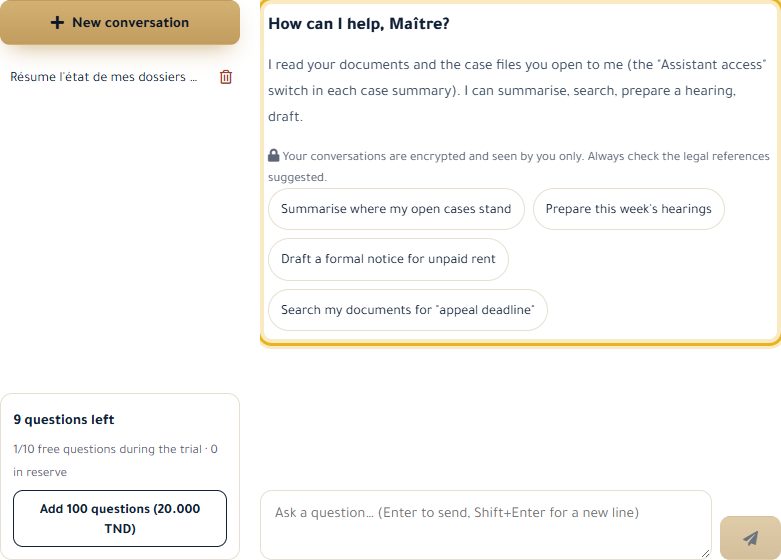
The assistant reads your documents and the cases you have opened to it, then answers and shows what it looked at.
When it suggests a document, a change or a note, click “Show the text”, then “Apply” or “Discard”. Nothing is saved without your approval.
“New conversation” starts afresh; your conversations stay in the left column.
Good to know
- Always check the legal references it suggests.
- 30 free questions a month with Pro (10 during the trial); you can add more once a card is saved on your subscription.
- Cases with access turned off stay invisible to the assistant; your conversations are encrypted.
Read next
- Write and organise my documents Write your deeds and letters, upload your files and file them in your cases.
- Manage my cases Create a case, track its hearings and deadlines, take notes and keep track of fees.
Documents and AI assistant
- Write and organise my documents Write your deeds and letters, upload your files and file them in your cases.
Write to our team: we reply quickly. Contact us