
Add an appointment myself
Put an appointment made by phone or at the office in your calendar, with a client on the platform or not.
For: Lawyer · Pro
Steps
In “Appointments”, click “Add an appointment”.
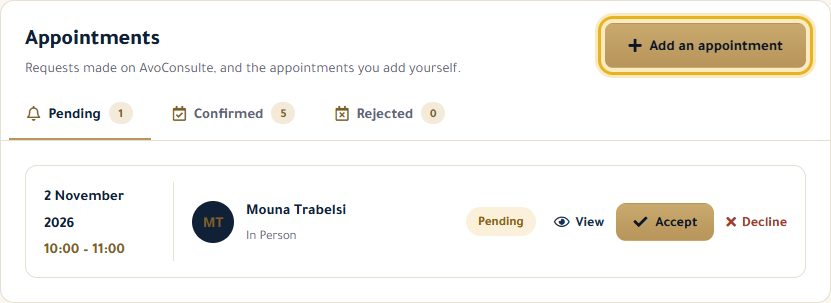
Under “Client”, choose “One of my clients on AvoConsulte” (they will get an email) or “Client outside AvoConsulte” (their name, plus their phone and email if you like).
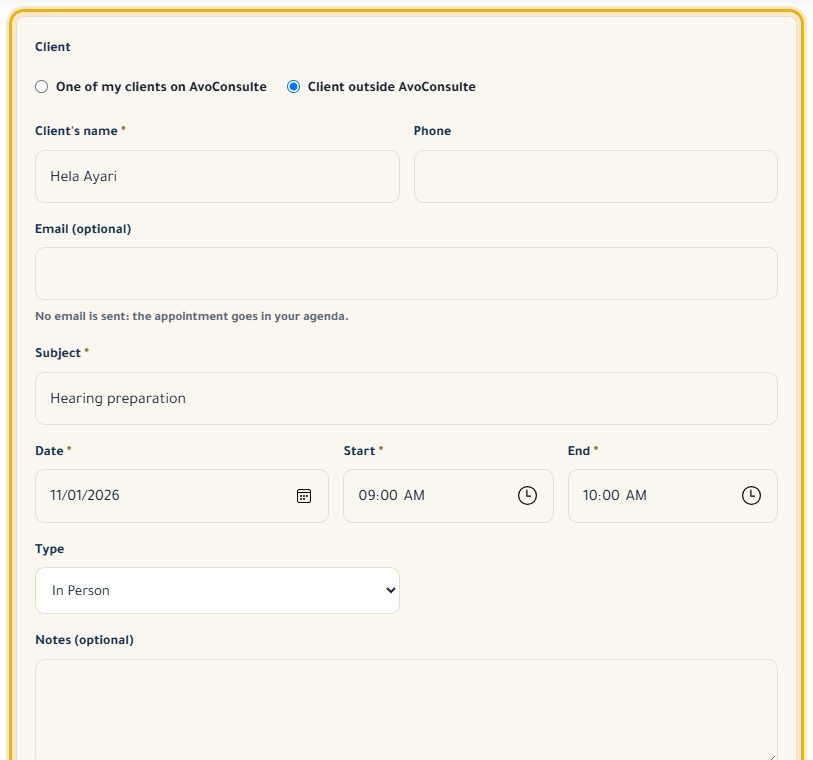
Enter the subject, date, start and end time, the type and any notes.
Click “Save appointment”: it is confirmed straight away and appears in your calendar.
Good to know
- An appointment lasts at most 12 hours and can't overlap another appointment or event.
- It can be outside your business hours.
- A client outside the platform never gets any email.
Read next
- Accept, decline and cancel appointments Answer your clients' requests and manage your confirmed appointments.
- My clients, including those outside the platform Find your clients, add those without an account and keep a private memo.
Appointments and calendar
- Accept, decline and cancel appointments Answer your clients' requests and manage your confirmed appointments.
- Create an event in my calendar Block out time (a hearing, a meeting…) so nobody can book it, and see your whole calendar.
Write to our team: we reply quickly. Contact us