
Apply for a lawyer account
Turn your account into a lawyer account, once our team has checked it.
For: Client, Lawyer
Before you start
- A confirmed AvoConsulte account.
- If you are already in the directory: claim your profile instead of creating a new one.
Steps
In your dashboard, open “Become a Lawyer”: the “Lawyer account request” form is pre-filled from your account.
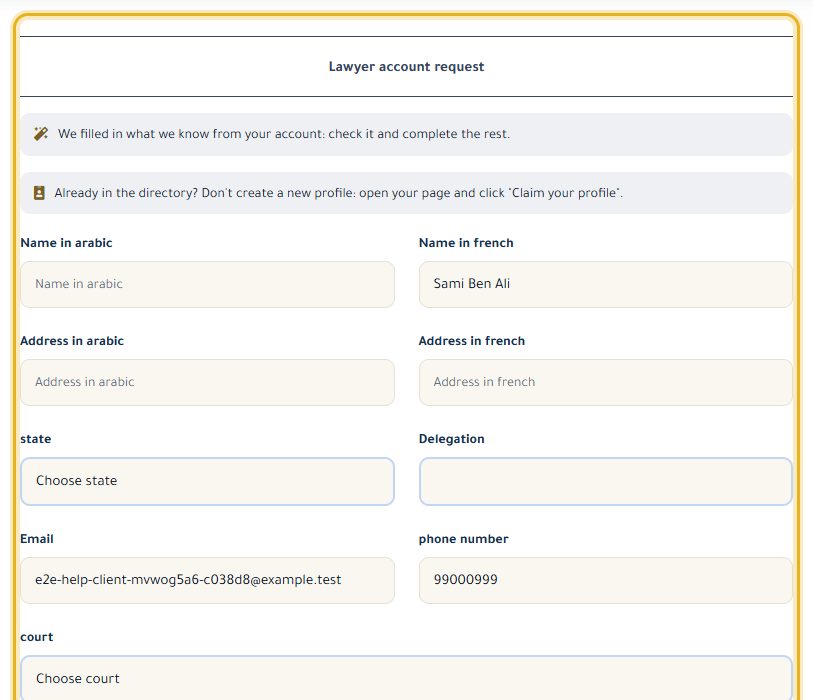
Fill in your names and addresses in Arabic and French, the governorate, the delegation, your phone, your court and a short introduction.
Click “Submit Request”. Your account is “under review”: you get an email as soon as a decision is made.
Once approved, your lawyer dashboard opens on your next visit.
Good to know
- If it is refused, your account goes back to being a client account and you can apply again.
Read next
- Claim my profile in the directory You are a lawyer and your profile already exists? Link it to your account.
- First steps on your lawyer dashboard What your dashboard shows, the menu, and the settings to do first.
My account
- Edit my profile, photo and email language Update your details, your photo, the language of your emails and your password.
- Claim my profile in the directory You are a lawyer and your profile already exists? Link it to your account.
Write to our team: we reply quickly. Contact us