
Claim my profile in the directory
You are a lawyer and your profile already exists? Link it to your account.
For: Client, Lawyer, Visitor
Before you start
- An AvoConsulte account with a confirmed email.
- Your profile in the directory (search for your name).
Steps
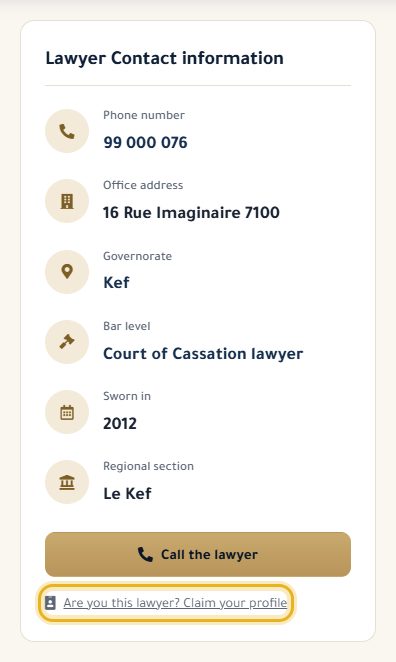
On your profile, below the contact details, click “Are you this lawyer? Claim your profile”.
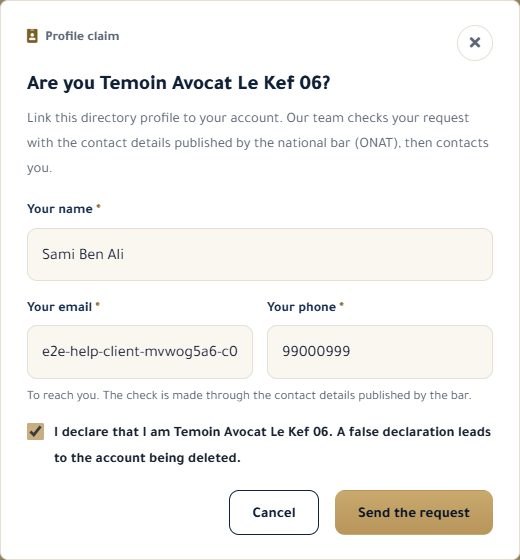
Check your name, email and phone, tick the declaration, then “Send the request”.
Our team contacts you using the details published by the Bar, and may send you a code by email or SMS.
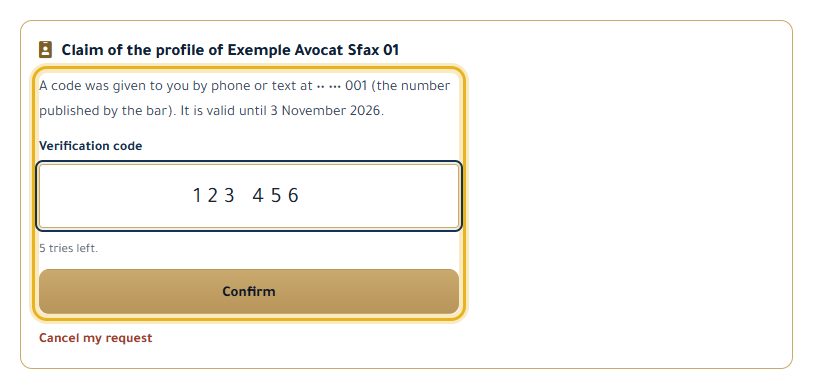
In your dashboard, on the “Become a Lawyer” tab, enter the code you received and click “Confirm”: your account becomes the lawyer account for that profile.
Good to know
- The code is valid for 3 days, with 5 attempts.
- A profile can be linked to only one account, and an account to only one profile.
- Our team can also approve your request directly after checking it.
- No account yet? After signing up, confirm your email, then come back to your profile to send the request.
Read next
- Apply for a lawyer account Turn your account into a lawyer account, once our team has checked it.
- First steps on your lawyer dashboard What your dashboard shows, the menu, and the settings to do first.
My account
- Edit my profile, photo and email language Update your details, your photo, the language of your emails and your password.
- Apply for a lawyer account Turn your account into a lawyer account, once our team has checked it.
Write to our team: we reply quickly. Contact us